
ACCOUNT HELP
Delete your account
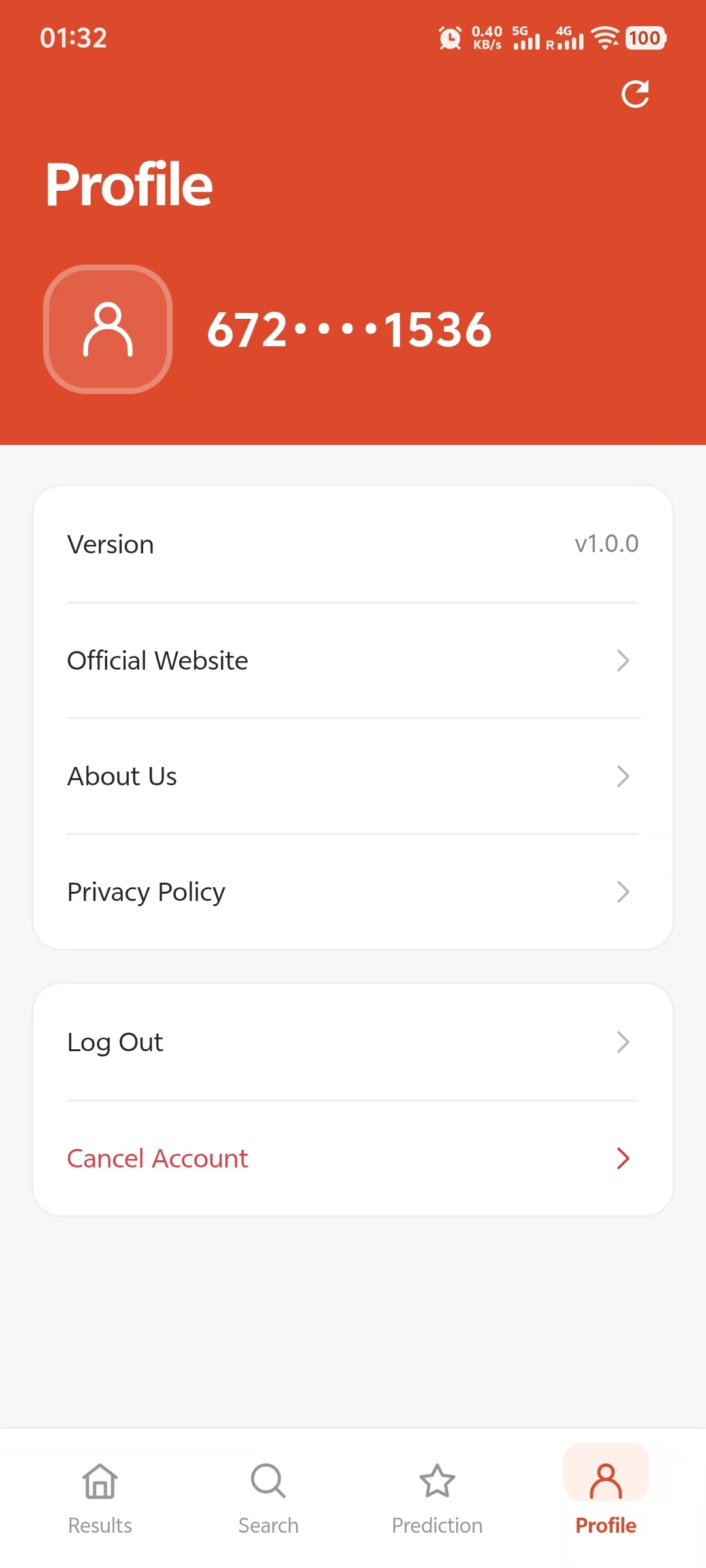
You can request cancellation from Profile in the Kerala Live results Android app. The screenshot below shows where to find Cancel Account.
Steps in the Android app
- Open Kerala Live results and choose Profile in the bottom navigation.
- Sign in to the account you want to cancel.
- Select Cancel Account in the lower menu card.
- Read the confirmation message and confirm your request in the app.
The request is submitted from the Android app. This website does not collect a password or verification code.
If you cannot access your account
Email [email protected] with the subject “Kerala Live results account deletion”. Identify the app and explain your request. The team may ask for information needed to verify account ownership. Do not send a verification code, password or payment details.
Logging out or uninstalling
Logging out clears your stored account session. Uninstalling removes the app’s local data under normal Android behavior. Neither action by itself submits an account cancellation request; use Cancel Account or contact the app team.
Last updated: November 1, 2026